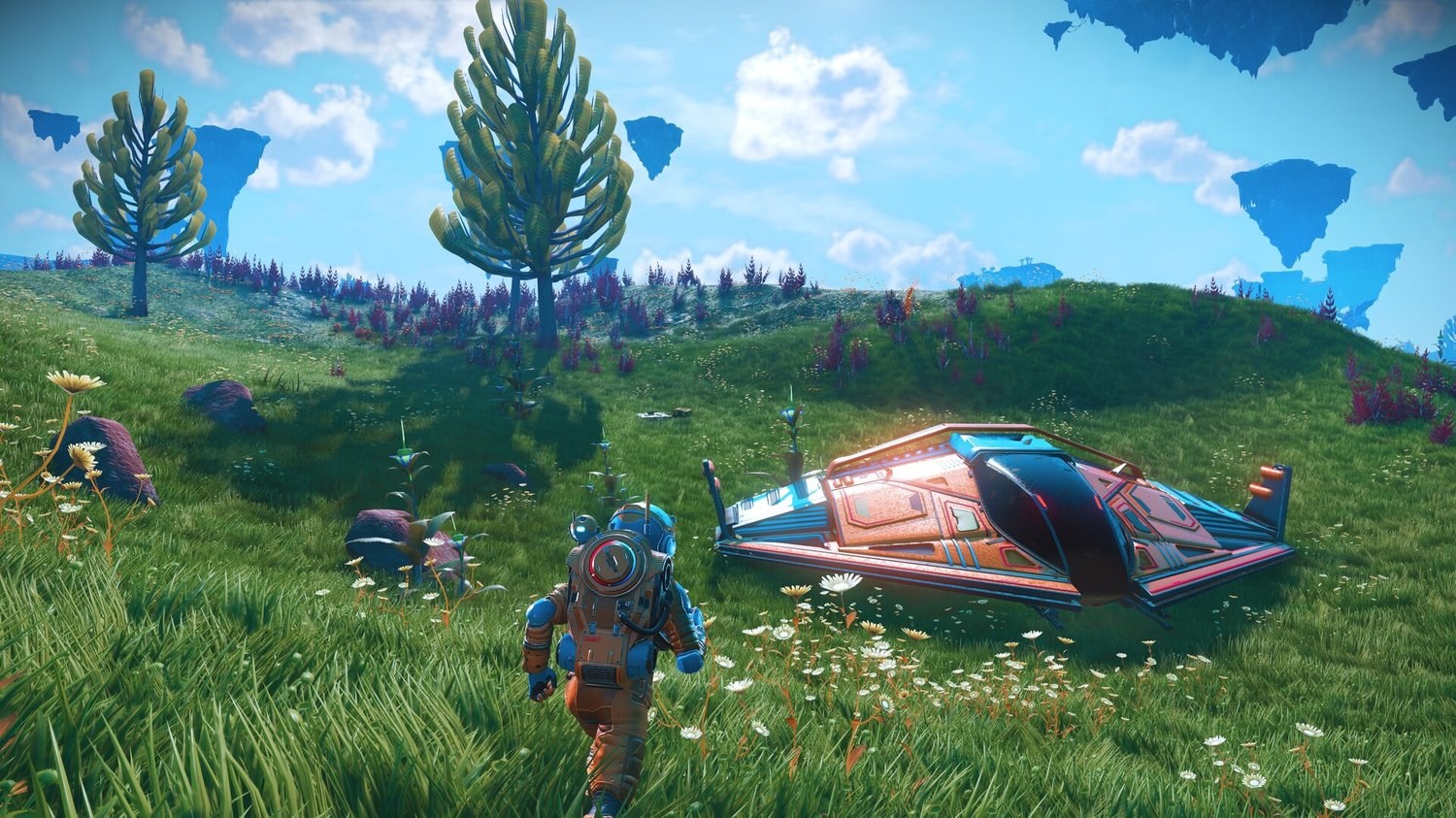
Every base in No Man’s Sky starts with a Base Computer, which costs 30 Chromatic Metal and claims the ground around it as soon as you choose Claim Base. Where you place it will decide what the base can do, and much of what you build after it, from the Base Teleport Module to extractors and farms, is going to need power.
Claiming the site registers it to you and adds the base to the space station teleporters. From then on, you will always be able to get there from any station. Pick the spot by what the base is for. An extractor base belongs on a power, mineral or gas hotspot, while a home is a lot easier on naturally flat ground.
Power is the part most new bases get stuck on. The Base Teleport Module needs 20 kPs to get you out again, two Solar Panels and one Battery for every 50 kPs will carry a base through the night, and an Electromagnetic Generator on a power hotspot is probably the best power you can get. Refiners need no power at all.
Most limits, power values and costs here are taken from the 7.14 (Forsaken) game files on PC, and the dates of what changed come from the official patch notes. Further down, this guide will also tell you how far a base can grow, how many bases you can own and why a friend’s base sometimes does not appear.
Contents
- Starting a base
- Base location
- Base power
- Base Teleport Module
- Base limits
- Sharing a base
- Base types
- Update history
- Base building FAQ
- Final tip
Starting a base
The story hands you your first base through the mysterious signal and the missions that follow it. The beginner guide follows those story steps. This section will only list the order the game asks for and what each blueprint costs in Salvaged Data. Salvaged Data is what you spend on base blueprints, and you will dig it up as Buried Technology.
- Place the Base Computer (30 Chromatic Metal) and choose Claim Base. The site is now registered to you, you get the upload and construction permissions for it, and the base appears in the space station teleporters.
- Build a small shelter with a Save Point (2 Salvaged Data) and a Storage Container (5 Salvaged Data). The container opens your own linked storage, which is explained under Storage Containers further down.
- Investigate the Base Computer Archives, build a Construction Research Unit and dig up Buried Technology for Salvaged Data. The first archive entry is free, and each later one needs more alien words: 3 for the second, 6 for the third and so on up to 30.
- Build the Base Teleport Module (2 Salvaged Data, crafted from 4 Metal Plating, 2 Carbon Nanotubes and 40 Sodium). It is what lets you teleport away from the base again.
- Finish Powering the Base with a Biofuel Reactor (1 Salvaged Data) and Electrical Wiring, which is free. The mission steps and the usual fixes are further down, under the Base Teleport Module.
- Explore the planet and expand the base. Solar Panels (8 Salvaged Data), Batteries (3), the Electromagnetic Generator (10), the Medium Refiner (10), the Landing Pad (10), the Galactic Trade Terminal (10), the Hydroponic Tray (3) and the Signal Booster (1) are the blueprints most bases will want next.
If you put the Base Computer in a bad spot, you can pick it up in build mode and put it somewhere else inside the base. Mind that the centre of the buildable area stays where you first claimed the site.
Base location
The best spot for a base depends on what the base is for. A farm of extractors has very different needs from a home you want to look at, and only the hotspots come with real game numbers. I would sort the location factors like this.
These three decide whether the base works at all:
- A clear purpose. Pick the spot by what the base is for (a home, an extractor farm, a teleport stop or a marker at a point of interest), because the other factors all depend on it.
- A power hotspot for a big base or an extractor base, ideally S- or A-class. An Electromagnetic Generator on it gives up to 150, 220, 250 or 300 kPs, depending on the hotspot class.
- A mineral or gas hotspot for an extractor base. Extractors only work on a hotspot, and they make about 250 units an hour on a C-class one and about 600 on an S-class one.
These are nice to have, mostly for comfort:
- Naturally flat ground. Ground you flatten yourself and rocks you clear can come back over time, and land that is flat to begin with saves you that repair work.
- Calm weather or a Paradise planet. This is about comfort only, since the game has no base rule for weather or storms.
- Low Sentinel activity. It is a good choice if you plan to do a lot of mining around the base, simply because it is more comfortable.
- Underwater. This one is for the looks, as almost every power and utility part can be built underwater.
- A good view. Scenery is probably the main reason for a home base, but it has no effect on gameplay.
And these two you can ignore:
- Being close to a space station or a portal. Any claimed base can be reached from any space station teleporter.
- Being close to a trading post for its terminal. A Galactic Trade Terminal of your own costs 10 Salvaged Data and needs no power.
Hotspots
A hotspot is an area on a planet that feeds one kind of base part, with power hotspots feeding Electromagnetic Generators and mineral or gas hotspots feeding the Mineral Extractors and Gas Extractors you build on them. You will find them with the Surveying upgrade for the Analysis Visor, and each one comes in a class from C up to S.
On a power hotspot, an Electromagnetic Generator gives up to 150 kPs on C-class, 220 on B, 250 on A and 300 on S-class at the centre, and less the further out you build it. There is no limit on how many generators you place. Beware that S-class power hotspots are rare, at only about 1 in 19.
On a mineral or gas hotspot, each extractor makes about 250 units an hour on a C-class hotspot and about 600 on an S-class one, and it holds 250 units, while a Supply Depot holds 1,000. A connected network stops gaining much past roughly 1,000 units an hour. As such, you are better off with several small networks, each with its own Supply Depots. Which resource is worth mining is a question for the money guide.
If the hotspot sits just outside your base, you do not have to start over. Each structure or technology part you place at the border will push the border out by 50u, up to 1,000u on a planet. Place a part at the border, walk up to the new border and place the next one. Rinse and repeat.
Paradise planets
For a home base, a calm planet is probably the nicest choice, simply because you are going to spend a lot of time walking around it. Paradise planets have the calmest conditions, but a lush planet with a calm weather word will usually serve you just as well.
Next to a settlement
A settlement is not a base. You claim it as Overseer, the player who runs the settlement, at its own terminal, and you can run up to four of them, one per planet. Inside its limits, the game blocks base parts and mining with “Cannot build within settlement limits”.
A Base Computer just outside the settlement will give you your own base next door. The settlement guide explains how the settlement’s own buildings work.
Base power
Power in No Man’s Sky is measured in kPs. Generators make kPs, parts like the Base Teleport Module or an extractor draw them, and a Battery stores kP for later. Everything wired together at one base forms a grid, and if the parts on a grid draw more than it makes while the batteries are empty, the whole base will go dark at once.
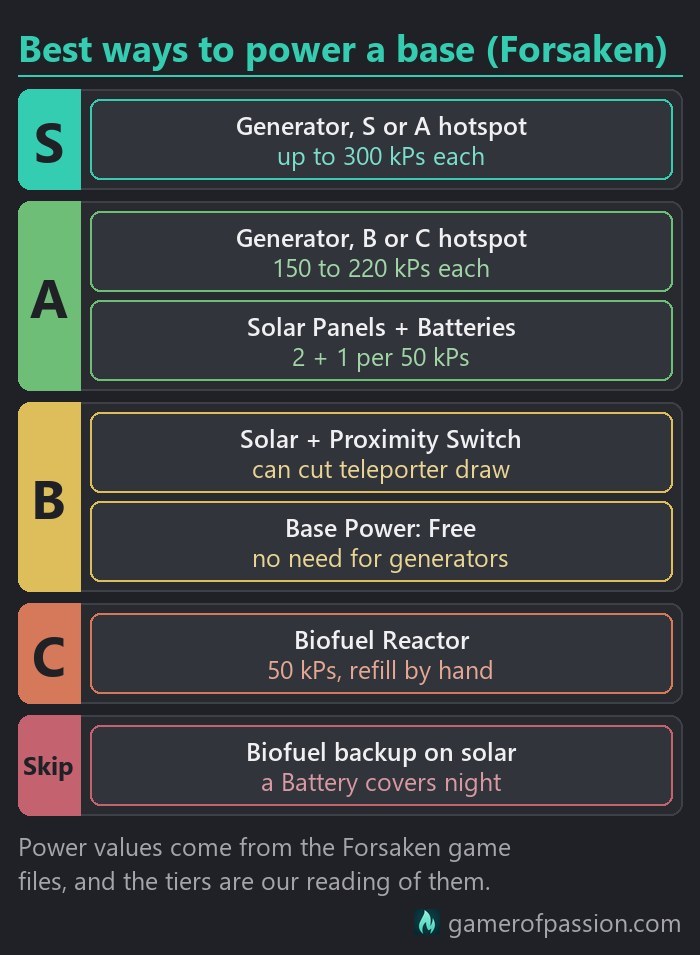
At the top of my ranking sits an Electromagnetic Generator on an S- or A-class power hotspot. Each generator gives up to 300 kPs on an S-class or 250 kPs on an A-class hotspot, with no fuel, no night and no cap on how many generators you place. It is the best choice for big bases, extractor farms and anything that runs day and night. The only problem is finding one, since only about 1 in 19 power hotspots is S-class.
One step down, in A tier, sit two setups. An Electromagnetic Generator on a B- or C-class power hotspot still gives 150 to 220 kPs per generator, and you can add more generators on the centre to scale it up. Most power hotspots are B- or C-class, which makes this the setup most hotspot bases will probably run on.
Solar Panels with Batteries share A tier, and they are what I would use for any base with no power hotspot nearby. A Solar Panel makes 50 kPs in daylight and a Battery stores 45,000 kP. Build two panels and one battery for every 50 kPs your base uses (220 kPs takes 9 panels and 5 batteries).
For a small outpost that only needs the teleporter now and then, you can try a Proximity Switch on the teleporter of a solar grid, which can cut its 20 kPs draw while nobody is near it. Base Power: Free shares that B tier, but only for custom or Creative saves, where setting Base Power to Free in the difficulty settings removes the need for generators and wiring.
The Biofuel Reactor lands in C tier. It makes 50 kPs and a full tank lasts about 50 hours of play, but it needs refilling by hand. Use it to get the teleporter running for the mission or at a teleporter-only stop, and then move on.
Lastly, I would skip a Biofuel Reactor as a backup on a solar grid. A Battery covers the night without any fuel runs.
| Part | kPs | Storage | Notes |
|---|---|---|---|
| Solar Panel | +50 by day, 0 at night | 0 | 8 Salvaged Data, 2 per 50 kPs of round-the-clock load |
| Battery | 0 | 45,000 kP | 3 Salvaged Data, 1 per 50 kPs of night load |
| Biofuel Reactor | +50 while fuelled | Furnace Tank 180,000 | 1 Salvaged Data, 1 Metal Plating + 25 Oxygen |
| Electromagnetic Generator | up to +150 C / +220 B / +250 A / +300 S | 0 | 10 Salvaged Data, no cap on count, less output off-centre |
| Electrical Wiring | 0 | – | 0 Salvaged Data, prefab rooms carry power to parts inside |
| Base Teleport Module | -20 | – | 1 per base, 2 Salvaged Data, power to teleport out |
| Mineral / Gas Extractor | -50 each | 250 units | needs a hotspot, no power = no extraction |
| Supply Depot | 0 | 1,000 units | needs pipes |
| Bio-Dome / Appearance Modifier | -50 each | – | – |
| Square Deepwater Chamber | -30 | – | – |
| Large Hydroponic Tray / Livestock Unit / Automated Feeder | -20 each | – | – |
| Health Station / Hazard Protection Unit | -10 each | – | – |
| Cylindrical Room / Square Room / Deepwater Chamber | -10 each | – | – |
| Cuboid Room / Curved Cuboid Wall / Curved Cuboid Roof | -5 each | – | – |
| Storage Container | -5 each | – | 10 per base |
| Hydroponic Tray / Standing Planter / Short-Range Teleporter | -5 each | – | also the Small Aquarium |
| ByteBeat Device | -3 | – | – |
| Lights, doors, corridors | -1 each | – | – |
| Medium / Large / Portable Refiner | 0 | – | no power socket, 3 Medium and 2 Large per area |
| Galactic Trade Terminal, Save Point, Signal Booster | 0 | – | no power socket, Base Computer and Landing Pad draw 0 |
Solar Panels
A Solar Panel makes 50 kPs in daylight and nothing at night. A Battery stores 45,000 kP, which is enough to run 50 kPs for about 15 minutes. For every 50 kPs your base uses, build two Solar Panels and one Battery, and wire them into the same grid.
The Batteries will take whatever the base does not use by day and give it back once it gets dark, which makes solar the easy answer for a base with no power hotspot nearby, although the numbers grow fast once you add extractors to the grid. A base with a teleporter and four extractors will already need nine panels.
Electromagnetic Generators
An Electromagnetic Generator needs a power hotspot, and it gives its full output on the centre (up to 150, 220, 250 or 300 kPs from C- to S-class). The further from the centre you build it, the less it will make. Aim for the middle. Since there is no limit on how many you place, a weaker hotspot is simply a reason to build two or three generators close to the centre instead of one.
The blueprint costs 10 Salvaged Data, which makes it one of the more expensive power parts. That being said, I would still build one on any base that sits on a hotspot.
Biofuel Reactor
A Biofuel Reactor makes 50 kPs as long as there is fuel in its Furnace Tank, and a full tank lasts roughly 50 hours of play. It needs refilling by hand, though. Use it to get the teleporter running, and make sure to switch to solar or an Electromagnetic Generator later. Once the tank runs dry, the reactor will show “Furnace Empty” and stop making power.
Wiring
Electrical Wiring is free to research, and it can be a little bit fiddly at first. Each wire has to snap onto a plug socket at both ends, and you will see green rings when it does.
Prefab rooms carry power to the parts inside them, which saves you a lot of wires in a bigger build. Floor pieces from the building sets do not carry power, though. A part that only stands on them will still need its own wire.
Each base runs its own grid. Generators at one base cannot power parts at another, even when the two bases sit side by side.
A sizing example
For reference, take a base with a Base Teleport Module and four extractors. The teleporter draws 20 kPs and each extractor 50, which adds up to 220 kPs. You can cover that in four ways:
- 9 Solar Panels and 5 Batteries.
- 2 Electromagnetic Generators on the centre of a C-class power hotspot.
- 1 Electromagnetic Generator on the centre of an S-class power hotspot.
- 5 Biofuel Reactors that you have to refuel by hand.
A teleporter on its own will take 1 panel and 1 battery. If a grid that needs several Batteries gets one fewer than the sizing says, it will run dry for a few minutes each night, and that tends to be exactly when you want to leave.
Base Teleport Module
The Base Teleport Module is probably one of the first parts you will want at every base. You can teleport to any base you have claimed from a space station teleporter, even if it has no Base Teleport Module. The module, one per base, is what lets you teleport out again, and it only works while it gets its 20 kPs. For getting around inside a big base, Short-Range Teleporters will do the job, and each one draws 5 kPs.
Since Remnant, space stations you visit are also added to the teleport list when you own a base in that system.
| Problem | Cause | Fix |
|---|---|---|
| “INSUFFICIENT POWER”, wire looks red | wire end not snapped to the socket | re-place the wire until green rings show at both ends |
| Reactor wired, still no power, “Furnace Empty” | no fuel in the Biofuel Reactor | select the Furnace Tank, add Carbon or Condensed Carbon |
| Works by day, dead at night | solar without enough batteries | 2 Solar Panels + 1 Battery per 50 kPs, all on one grid |
| Module on alloy, wood or stone floor, no wire | building-set floors do not carry power, prefab rooms do | run a wire to it, or power the prefab room it stands in |
| Everything looks wired, still unpowered | stale grid state | save, reload, if needed rebuild the room or the wire |
| Whole base goes dark at once | total draw above generation, batteries empty | add generation or switch parts off, check Manage Power Grid |
| Power wired from a neighbouring base | grids do not cross bases | build a generator inside this base |
| Cannot build a second teleporter | 1 Base Teleport Module per base | use Short-Range Teleporters inside the base |
| Stuck at a visited base whose teleporter is dead | arriving needs no module, leaving does | walk to your ship |
| Powering the Base will not complete | wire, fuel or stale grid, no mission bug found | snap the wire, fuel, save + reload, select it in Mission Log |
Insufficient power
When the module shows “INSUFFICIENT POWER”, the game will often hint at it with “Base Power Low” as well. The usual causes are a wire end that has not snapped to its socket, a Biofuel Reactor whose tank shows “Furnace Empty”, or a solar grid with too few batteries that runs out at night. Open Manage Power Grid to compare what the base makes with what it draws, and if everything looks wired but stays dark, save and reload before you rebuild anything.
Stuck at a visited base whose teleporter is dead? Simply walk to your ship.
Powering the Base
Powering the Base is the mission that teaches you base power, and it asks for five things in order:
- Learn the Biofuel Reactor, either at the Construction Research Unit or from Buried Technology.
- Build the Biofuel Reactor.
- Learn Electrical Wiring, which is free.
- Wire the reactor to the Base Teleport Module.
- Put fuel in its Furnace Tank (Carbon or Condensed Carbon).
No mission bug is known. If the step will not finish, re-place the wire until both ends snap with green rings and refill the tank. Then save, reload and select Powering the Base in the Mission Log again.
Base limits
Most base limits are generous enough that you will not notice them on your first few bases, and most of them will show a message of their own once you hit them. The ones that start to matter later are the number of bases, the shared part limit, the upload size and how far a base can grow.
| Limit | Number or rule | What the game shows |
|---|---|---|
| Planetary bases | up to 400 per save | “Maximum Number of Planetary Bases Reached” |
| Deep-space bases | own count, they do not use up the 400 | “maximum number of bases already registered to this user” |
| Settlements | up to 4, 1 per planet | “Maximum settlements reached” |
| Freighter base | 1, buying another replaces it | “the base in your current freighter will be deleted” |
| Parts per save | 16,000, shared by all bases and the freighter | no part counter |
| Complexity per base | not a part count | “Cannot Construct: Base at Maximum Complexity” |
| Visible parts | capped by default on PC | Base Complexity Limits option |
| Radius at start | 300u from the Base Computer | “Base Out Of Range” |
| Radius growth | +50u per structure or tech part at the border, max 1,000u | same message |
| Spacing | no Base Computer inside another base | “Within Existing Base” |
| Storage Containers | 10 per base, 1 each of 0 to 9, a link to your own storage | “Limited to 1 per base” for each of 0 to 9 |
| Landing Pads | 9 per base | “Limited to 9 per base” |
| Galactic Trade Terminal | 10 per base | “Limited to 10 per base” |
| Refiners | 3 Medium and 2 Large per area, Portable no cap | a cap per local area |
| NPC terminals | 1 of each per base | “Limited to 1 per base” |
| Base Teleport Module | 1 per base | “Limited to 1 per base” |
| Upload cap | uploads only with 3,000 parts or fewer | “Upload Unavailable (Base Limit Exceeded)” |
| Upload minimum | a minimum exists | “Upload Unavailable (Base Too Small)” |
| Uploads per planet or system | 1 per planet, deep space 1 per system since Forsaken 7.10 | “Upload (Overwrite previous upload for this planet)” |
Number of bases
One save can hold up to 400 planetary bases, and your freighter, settlements and deep-space bases do not use up that number. At the cap, a new Base Computer will show “Maximum Number of Planetary Bases Reached” until you delete one of your old bases. There is a cap, then, but 400 is far more than most saves will ever need.
Part limit
Each save holds 16,000 base parts in total, shared by all your bases and your freighter. A single base can only be uploaded while it has 3,000 parts or fewer. Since the game has no part counter, the Upload option at the Base Computer is your gauge: it turns into “Upload Unavailable (Base Limit Exceeded)” once the base is too big.
Base Complexity Limits is an option that limits how many base parts are visible at the same time, and it is on by default on PC. If parts of a big base flicker or vanish at a distance, this is where to look. Switching it off will bring them back, at some cost to frame rate.
Base radius
A new Base Computer gives you 300u of building room in every direction. Each structure or technology part you place at the border will push it out by 50u, up to 1,000u on a planet. Whenever you try to build past the border, the game will tell you “Base Out Of Range”.
You cannot place a Base Computer inside another base, as the game stops you with “Within Existing Base”. Bases whose areas overlap will make you pick the base you are editing with Switch Base. As such, keep two bases 2,000u apart if both should grow to full size.
Deleting a base
Deleting parts one at a time will give you every resource back. The Delete Base option at the Base Computer is faster, but it will return only part of the materials, and you collect them from a Base Salvage Capsule that you build at one of your bases. For a big base full of expensive parts, the slow way is probably worth the extra time. It is boring, but it is free.
Sharing a base
Base permissions sit in the pause menu under Options > Network: Can add base parts, Can delete base parts and Can edit base terrain, plus Can access refiner. Set them to Group & Friends or Anyone so a friend can build, and stay in the session, because guests can only change your base while you are there with them.
Base Sharing is a separate setting. It decides whether your uploaded bases are shared online, shows as “Base Sharing: On” or “Off”, and stays undecided until you answer the “Enable Base Sharing?” prompt.
Uploading is what lets other players see your base when you are offline. You do it with Upload Base at the Base Computer, and each upload will replace your previous upload on that planet. A very small base shows “Upload Unavailable (Base Too Small)”, and since Forsaken 7.10 you can also upload one deep-space base per star system. On crowded community planets, older uploads can drop out of the server list, and uploading your base again puts it back.
| Setting | Values | What it does |
|---|---|---|
| Base Sharing | Base Sharing: On / Off, “Enable Base Sharing?” prompt | shares your uploaded bases online |
| Can add base parts | Group & Friends or Anyone so a friend can build | sets if guests can add parts to a base you own |
| Can delete base parts | same values | sets if guests can remove parts from a base you own |
| Can edit base terrain | same values | sets if guests can edit the terrain around a base you own |
| Can access refiner | same values | sets if guests can add or remove items in your refiner |
| Guest status at the owner’s Base Computer | “Construction Permissions: Unlocked” / “Unavailable” | tells a visitor whether they can build |
| Upload Base at the Base Computer | “Upload (Overwrite previous upload for this planet)” | makes the base visible while you are offline |
Playing with a friend
A base belongs to whoever claimed its Base Computer. A friend who visits can check their rights at your Base Computer, where “Construction Permissions: Unlocked” means they can build. They will only be able to do that while you are in the session with them. Make sure to plan shared building for times when you both play.
A multiplayer bug in mid-2026 made parts placed by a guest fade out a few seconds later, and the materials were not refunded. If it happens to you, test with one cheap part first, then let the base owner place the parts or build from your own Base Computer next door.
Friend’s base not showing up
A friend’s base only appears when you are in their session or when they have uploaded it. Only their last upload on each planet is kept, and deep-space bases could not be uploaded until Forsaken 7.10. If you still cannot see it, go through this list:
- The base was never uploaded. The owner has to use Upload Base at the Base Computer.
- The owner uploaded a different base on the same planet later. Uploading the wanted base again fixes it, as the last upload wins.
- The base is too big to upload, since a base only uploads with 3,000 parts or fewer (“Upload Unavailable (Base Limit Exceeded)”). Visit it in the owner’s session or trim it down.
- Base Sharing is Off or was never answered. Set it to Base Sharing: On.
- You are not in the owner’s session. Join their group through the Network options (the Nearby Players list), and the full base will stream to you.
- A crowded community planet dropped the older upload. The owner simply uploads it again.
- It is a deep-space base built before Forsaken 7.10. Update the game and upload it again.
- User content is disabled on your platform, and the game shows “Featured bases disabled”. Check the platform’s user-content setting.
- Parts pop out at a distance. Look at Base Complexity Limits in the options, or the Base Complexity graphics option on PC.
- Your friend gets “Cannot Build / No Edit Permission”. The owner sets Can add base parts to Group & Friends or Anyone and stays in the session.
- Your friend’s new parts fade out after a few seconds. This is the mid-2026 bug above. Test with one cheap part, let the owner place the parts, or build from a second Base Computer next door.
Base types
Most of this guide is about planet bases, but No Man’s Sky has a few other kinds of base by now, and each one plays by slightly different rules.
| Base type | What you can build | Limits | Getting there |
|---|---|---|---|
| Planet base | Base Computer (30 Chromatic Metal), then the full Build Menu | up to 400, 300u start, up to 1,000u | any space station teleporter |
| Deep-space base | Deep-Space Base Computer on an asteroid or in empty space | own count, radius up to 400u, 1 upload per system | space station teleporter |
| Freighter base | rooms, up to 10 Storage Rooms, 1 Base Teleport Module | 1 freighter, parts count toward the 16,000 | visit another’s freighter by joining their group |
| Settlement | no Build Menu parts, the Overseer picks buildings | up to 4, 1 per planet | Space Station Teleporter |
| Station annexe | the full range of base parts inside a station you direct | Station Director only | the station itself |
Deep-space bases
Since COSMOS (7.0) you can claim a base in space with a Deep-Space Base Computer, either on a flat asteroid platform or in empty space while you spacewalk. A Habitable Asteroid Chart will help you find a platform. Deep-space bases do not use up the 400 planetary bases and have a count of their own, and you can build power parts on them as well.
Since Forsaken 7.10 you can upload one deep-space base per star system. Before that, a friend’s space base could only be seen while you were in the owner’s session.
Freighter base
Your freighter carries a base of its own, built from freighter rooms instead of the planet Build Menu. It can hold up to 10 Storage Rooms linked to your Storage Containers and one Base Teleport Module, but no solar, batteries, generators or extractors. Its parts will count toward the same 16,000 per save as your planet bases. If you swap freighters later, the freighter guide explains how to move the base across.
Settlements
Settlements count apart from your bases, and you run them as Overseer from their own terminal instead of the Build Menu, which means you can build your own base just outside one while the settlement’s limits stay closed to base parts and mining.
Storage Containers
Storage Containers 0 to 9, up to 10 per base, work as a link to your own storage rather than as boxes. Container 3 at any base, Storage Room 3 on your freighter or in an orbital base and the cargo wall of a corvette all open the same items. A friend who opens your container will see their own things. Each container has 50 slots and draws 5 kPs.
Update history
Base building has changed a fair bit over the last few updates. These are the main base changes in the official patch notes since 2023, oldest first:
- Fractal revamped hotspot surveying and fixed doors that did not connect to power grids.
- Worlds Part II added a Favourites tab to the teleporter.
- Voyagers made the game load faster near large planetary bases.
- Remnant added visited space stations to the teleport list when you own a base in that system.
- COSMOS (7.0, September 2026) added the Deep-Space Base Computer and orbital bases, asteroid platforms, new corridor parts and the station annexe, plus faster loading of bases and base power.
- Forsaken (7.10, October 2026) added Uploadable Space Bases, one per star system, gave planetary trading outposts a corvette landing pad and optimised the teleporter interface.
Forsaken did not change base power, but it lets you upload off-planet bases for other players to visit and build the Oxygen Harvester anywhere on a planet. The base count and the part limit stayed the same as well. The rest of the patch is in our Forsaken update post.
Base building FAQ
Can you have unlimited bases?
No. One save holds up to 400 planetary bases, and your freighter, your settlements and any deep-space bases do not count toward them. At the cap, you will have to delete an old base before a new Base Computer works again.
Is it necessary to build a base?
The story will ask you to build one early on, and the Base Computer Archives that hand out new blueprints run through it. Additionally, a base is what gives you Storage Containers, extractors, farms and a teleport point. A small one will do just fine if building is not really your thing.
Can two players have a base on the same planet?
Yes, as long as the new Base Computer is not inside another base. Other players will see the last upload each of you made on that planet.
How do I find my base again?
Any space station teleporter will list the bases you have claimed, whether they have a Base Teleport Module or not. If the list gets long, the Favourites tab in the teleporter keeps the bases you use most at hand.
What is the best way to power a base?
An Electromagnetic Generator on a power hotspot, ideally S- or A-class, since it needs no fuel and keeps going at night. Without a hotspot nearby, build two Solar Panels and one Battery for every 50 kPs your base uses. The Biofuel Reactor is only a start.
What is the best planet for a base?
It depends on what the base is for. An extractor base wants a planet with a good power, mineral or gas hotspot, while a home base is probably happiest on a calm planet with naturally flat ground and a view you like.
Final tip
Before you put hours into a big build, claim the site and get a Base Teleport Module running on its 20 kPs. That way, you will always be able to teleport out again. If all you want is a base that keeps working while you are away, then an Electromagnetic Generator on a power hotspot is probably your best bet, and solar with enough Batteries will cover everything else.