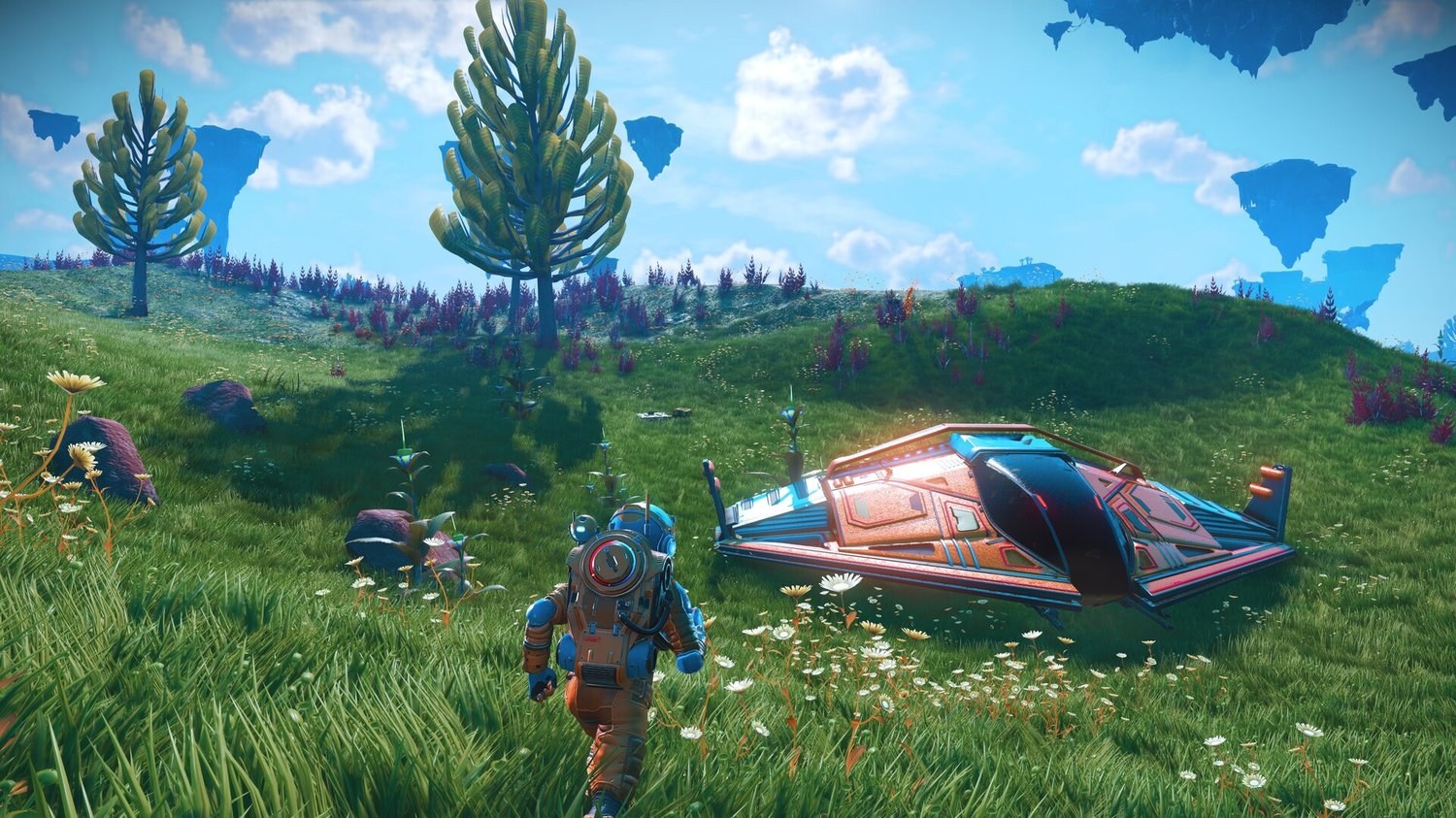
If you are starting No Man’s Sky for the first time, the opening hours can feel like a lot at once. You will wake up next to a broken ship on a random planet, your exosuit will keep warning you about the weather, and the game will throw a dozen resources, recipes and terminals at you before you have even left the ground.
None of it is hard once you know the order, but the game rarely tells you what can wait, and most guides out there were written before COSMOS reworked space in September 2026.
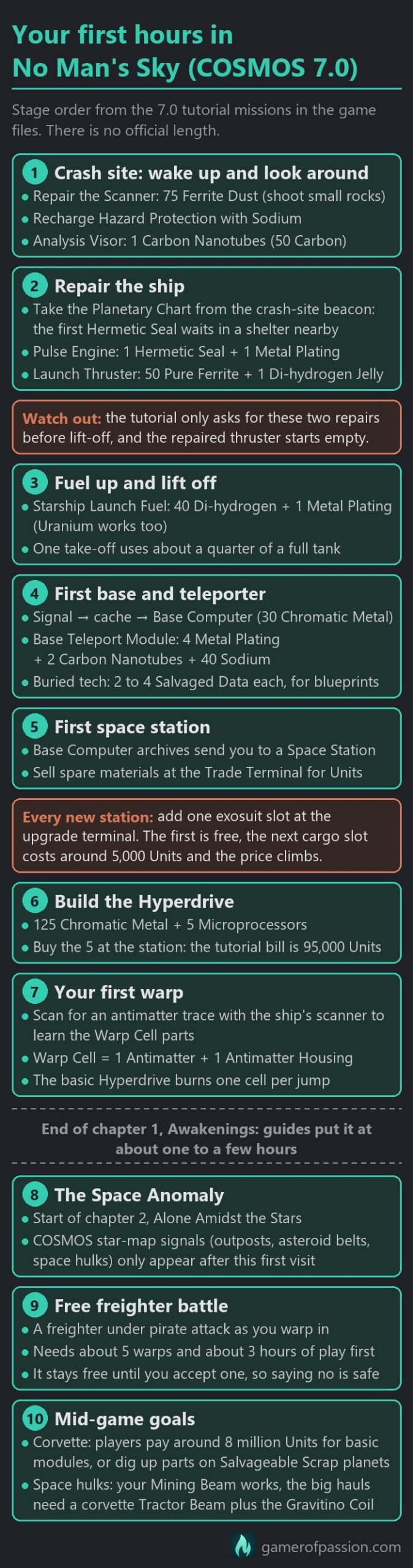
Everything below is written for COSMOS 7.0 and its patches up to 7.06, the live PC version in late October 2026. Your first hours, in the order you will meet them, look roughly like this:
- Start a Normal save with Tutorial Missions switched on, then set PvP to “No one” under Options > Network.
- Keep your Hazard Protection topped up with Sodium from yellow plants and your Life Support with Oxygen from red plants.
- Repair the Scanner and install the Analysis Visor, then fix only the Launch Thruster and the Pulse Engine on your ship.
- Take the Planetary Chart from the distress beacon to find the Hermetic Seal, and sit out the scripted storms in a cave or in your ship.
- Build your first base where the story asks, dig up buried technology for Salvaged Data and unlock the teleporter before anything else.
- At your first space station, take the free exosuit slot, sell spare materials and buy the 5 Microprocessors the Hyperdrive needs.
- Craft Warp Cells, make your first warps and follow the story until it brings you to the Space Anomaly. The new COSMOS points of interest on your star system map only appear after that first visit.
- Analyse every new plant, creature and mineral along the way, and claim the fauna bonus on each planet for extra nanites.
- After about five warps and three hours of play, rescue a freighter from pirates and take it for free.
Most recipes, costs and timers below come from the game files of the live PC build and from the official patch notes.
Contents
- Game mode and settings
- Leaving the crash site
- Your first base
- Space stations
- The Hyperdrive
- Units and nanites
- Upgrading your gear
- Space Anomaly and free freighter
- COSMOS on a new save
- Story length
- Beginner mistakes
- Common problems
- Things that can wait
- Beginner questions
- Conclusion
Game mode and settings
Start your first save on Normal. A death will not hurt too much there, since the items you carry stay behind in a grave where you died. Relaxed is fine as well if you want less pressure. Hazards and life support drain more slowly, you keep your items when you die, and fuel and purchases cost less.
Survival and Permadeath are a different story. On Survival, hazard protection will run out three times as fast as on Normal, shops sell fewer survival items and the items you carry are destroyed when you die. Permadeath deletes the whole save. I would keep both for a second run, once you know where to find Sodium, Oxygen and shelter without thinking about it. Creative switches the tutorial off, removes the survival bars and starts you with a hyperdrive already installed, which is fine for building but skips most of what the opening missions teach you.
You will find what each preset changes in the table below.
| Mode | What changes | Who it suits | Can you change it later? |
|---|---|---|---|
| Normal | The baseline: normal drains, and when you die your items drop into a grave you can go back to | Your first save; the safe place to start | Almost every setting, in the options menu. Tutorial Missions only when you create the save |
| Relaxed | Hazards and life support drain more slowly, you keep your items when you die, fuel and purchases cost less | Anyone who wants less survival pressure | Yes, the same as Normal |
| Survival | Hazard protection drains three times as fast as on Normal; fewer survival items in shops; carried items are destroyed on death | A later run, once you know the basics | Most settings, yes |
| Permadeath | Survival rules, and dying deletes the save | A later run | Only partly, as some restrictions apply |
| Creative | No survival bars, free crafting, all slots unlocked, hyperdrive pre-installed, no tutorial | Free building once you know the game; not a first save | Settings yes, but the tutorial stays off on that save |
| Custom | Almost Normal, but smaller stack limits (raise them at creation); you set every option; Tutorial Missions on by default | Players who want Normal with their own tweaks | Most options. Tutorial, starting slots, recipes and the Abandoned option are set at creation only |
| Expedition | A timed event with milestones; phase rewards can be claimed on every save. PvP is on by default here too | Players who know the basics. Our Journey Continues was scheduled to end around October 28, 2026 | A fresh expedition save turns into a Normal save when the event ends |
Custom settings to check
Custom starts from almost the same values as Normal and lets you set every option yourself. Whatever else you change, leave Tutorial Missions switched on. The game itself recommends it for new players, and you can only set it when you create the save, so there is no way to turn the tutorial back on later. Starting Slots and Recipes & Blueprints are locked in the same way. Also stay away from the Abandoned universe option. It removes all advanced alien life from the universe, and with it the story and the tutorial, for good on that save.
Almost every other setting can be changed later in the options menu, so you can make something easier the moment it starts to feel like a chore. The exception is Inventory Stack Limits, which you can lower later but never raise again. Custom sets them one step lower than Normal by default, so pick the highest option before you create a Custom save. One quick win sits in the accessibility settings. Lower Hazard Effects there, and storms and frost will blur your screen far less.
PvP and network options
PvP is switched on by default when you start a new save. Once you are in the game, open Options > Network and set the PvP option (“Can damage players”) to No one. The setting is stored per save, which means you will have to repeat it on every new save and every expedition. While you are in that menu, also check who is allowed to add or delete parts of your base.
Should you start in the expedition?
If you have never played before, or the expedition has already ended by the time you read this, start a normal save with the tutorial on. Our Journey Continues, the 10th-anniversary expedition, was scheduled to end around October 28, 2026, and it works well as a guided tour of ten years of features, although it assumes you already know the basics.
If you want to try it anyway, what you keep depends on how you start it. Started as a brand-new save, the whole save is yours, and it becomes a normal save with your ships, freighter, inventory and progress intact when the expedition ends. Started from an existing save at the Expedition Terminus on the Space Anomaly, it runs alongside your main save instead. Only the items you put in the Terminus go back, everything else is turned into units or nanites (plus bonuses for feats), and the freighter and extra ships you collected there stay behind. Your bases and discoveries are shared either way, and the phase rewards can be claimed on every save.
Leaving the crash site
Your first goal is simple: get off the starting planet. To do that, you are going to repair your Scanner, install the Analysis Visor, fix the Launch Thruster and the Pulse Engine, fuel the thruster and take off. Everything else on the ship can wait.
The ship you crashed in is the Radiant Pillar BC1, a C-class Fighter. Every new Normal save starts with this same ship, so it’s not bad luck that yours looks a little bit plain. You will replace it sooner or later anyway.
Default controls
You will open the Quick Menu all the time. It lets you recharge your exosuit and your Mining Beam without opening the inventory, and once you are in space it also opens the Galaxy Map. You will find its default button below, together with the other basics of your first hour:
| Action | PC (keyboard and mouse) | PlayStation | Xbox |
|---|---|---|---|
| Quick Menu | X | D-pad down | D-pad down |
| Scan | C | L3 | Left stick click |
| Analysis Visor, then analyse | F, then left mouse button | L2, then R2 | LT, then RT |
| Interact and harvest plants | E | Square | X |
| Fire the Mining Beam | Left mouse button | R2 | RT |
| Switch weapon mode | G | Triangle | Y |
| Jump (hold for the jetpack) | Space | Cross | A |
| Melee boost (sprint, melee, then jetpack) | Shift, Q, Space | R3, R1, Cross | Right stick click, RB, A |
| Build Menu | Z | D-pad up | D-pad up |
| Inventory | Tab | Touchpad | View button |
| Galaxy Map | M in your ship, or the Quick Menu in space | Quick Menu in space | Quick Menu in space |
| Pulse Engine (in space) | Space | L1 + R1 | LB + RB |
If you have switched the Sprint / Scan or the Quick Menu / Build Menu button layout in the options, those buttons will have traded places.
Survival bars and scanning
From the first minute, keep an eye on your two exosuit bars. Life Support is refilled with Oxygen, Life Support Gel or Dioxite, and Hazard Protection with Sodium, Sodium Nitrate or Ion Batteries. Yellow plants give Sodium and red plants give Oxygen, so you will never be far from a refill. That being said, it is a good habit to recharge with crafted Ion Batteries (10 Cobalt and 5 Ferrite Dust, with Cobalt found in caves), because your raw Sodium and Oxygen will be needed for other recipes soon. If Hazard Protection gets damaged, it appears as a Quick Repair option in the Quick Menu.
Early on, the game will ask you to repair your Scanner, which costs 75 Ferrite Dust. You get Ferrite Dust by mining rocks with your Mining Beam and Carbon by mining plants, and the beam itself runs on Carbon. Next, craft Carbon Nanotubes from 50 Carbon and install the Analysis Visor with them.
Analyse every new rock, plant and crystal type with the Visor before you mine it. You will get units for the discovery, and scanning reveals the item’s secondary element, which you then also collect when you mine that type of rock or plant (for example Di-hydrogen from some minerals). It does not make the main resource drop bigger, though.
One movement trick is worth learning early as well. Sprint, hit melee and then use the jetpack, and you will cover a lot more ground per jump than by walking.
Launch Thruster repair
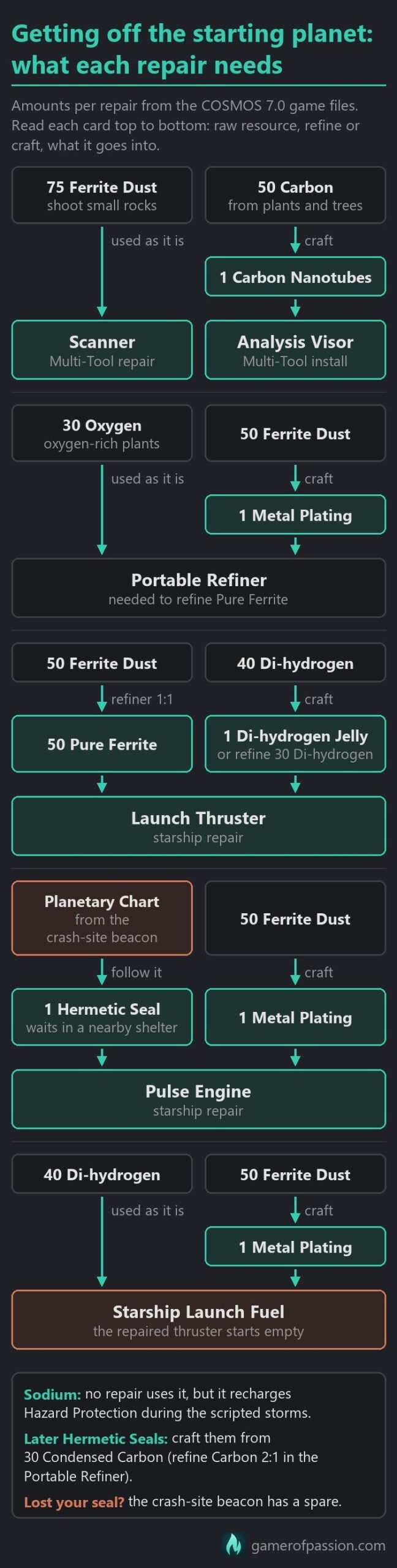
Craft Metal Plating from 50 Ferrite Dust, then build a Portable Refiner from 1 Metal Plating and 30 Oxygen. It only takes one input at a time, but that is all you need for now. Refine Ferrite Dust into Pure Ferrite at 1 to 1, as the Launch Thruster repair will cost you 50 Pure Ferrite and 1 Di-hydrogen Jelly. You can craft the Jelly from 40 Di-hydrogen, or refine 30 Di-hydrogen into 1 Jelly if you do not mind waiting.
The chart below shows how the raw resources turn into the parts for both repairs.
Beware that the Portable Refiner needs fuel as well. Put Carbon or Condensed Carbon into its fuel slot, otherwise it will show “Refiner Offline: No Fuel” and refine nothing. Condensed Carbon gives three times as much charge per unit, and the Medium Refiner you will build at your base later on runs without any fuel.
The Hermetic Seal and the first storm
The Pulse Engine repair costs 1 Hermetic Seal and 1 Metal Plating, and you cannot craft the first Hermetic Seal. Open the distress beacon at the crash site, take the Planetary Chart and follow it to a small shelter nearby, where the seal will be waiting for you. The tutorial teaches you the seal recipe (30 Condensed Carbon) along the way, and if you lose the seal, the beacon has a spare.
The first storms are part of the tutorial. One will roll in as you set off to find the Hermetic Seal, and more will turn up while you build your first base and dig for base blueprints. They are short, and on Normal you can keep walking as long as you top up Hazard Protection, or wait it out in your ship, a building or a cave. Storms are also your first real chance at money, as Storm Crystals only appear during storms and have a base value of around 206,000 units each.
Natural caves are the best shelter. Inside one, Hazard Protection stops draining and refills on its own without using up any Sodium. Your ship and buildings also keep the weather off you, and the bar can refill there as well. A hole you dig with the Terrain Manipulator later on is weaker. It stops the drain as long as there is terrain over your head, but do not count on it refilling the bar the way a natural cave does.
Launch fuel
A repaired Launch Thruster is empty. Fuel it with Starship Launch Fuel (40 Di-hydrogen and 1 Metal Plating) or with Uranium, as raw Di-hydrogen will not go into the thruster directly. A take-off from the ground uses about a quarter of a full tank in the starter Fighter on Normal. Explorer ships use half as much, Shuttles about two thirds, and Survival costs a little more. Taking off from a landing pad costs nothing, which makes settlements with pads good stops. Make sure to carry a spare Launch Fuel in the first hours, as running dry away from your base is an easy way to get stranded.
What not to repair yet
The repair mission only asks for the Launch Thruster and the Pulse Engine. The Deflector Shield and the Photon Cannon already work on the starter ship, and if any other tech gets damaged early on, let it wait. A shield repair alone would cost you 50 Chromatic Metal and 13 Sodium Nitrate, and you are going to need that Chromatic Metal for your Base Computer and the Hyperdrive soon after.
The table below lists every recipe you will need from the crash site to your first warp, including the first base parts and the Hyperdrive.
| Step | Item | Ingredients | Where you get them |
|---|---|---|---|
| 1 | Scanner (repair) | 75 Ferrite Dust | Ferrite Dust: mine small rocks with the Mining Beam |
| 2 | Carbon Nanotubes | 50 Carbon | Carbon: plants and trees |
| 3 | Analysis Visor | 1 Carbon Nanotubes | Craft the nanotube first |
| 4 | Metal Plating | 50 Ferrite Dust | Ferrite Dust from small rocks |
| 5 | Portable Refiner | 1 Metal Plating + 30 Oxygen | Oxygen: red plants. Place the refiner from the Build Menu |
| 6 | Pure Ferrite | Refine 1 Ferrite Dust to 1 Pure Ferrite | Your Portable Refiner |
| 7 | Di-hydrogen Jelly | Craft from 40 Di-hydrogen, or refine 30 Di-hydrogen into 1 | Blue Di-hydrogen crystals; find them with the Scanner |
| 8 | Launch Thruster (repair) | 50 Pure Ferrite + 1 Di-hydrogen Jelly | Pure Ferrite and Jelly from the steps above |
| 9 | Hermetic Seal (first one) | Found, not crafted. Later ones: 30 Condensed Carbon | At the crash-site beacon, choose Take Planetary Chart and follow it to a small shelter |
| 10 | Pulse Engine (repair) | 1 Hermetic Seal + 1 Metal Plating | The seal from the shelter; if you lose it, the beacon has a spare |
| 11 | Starship Launch Fuel | 40 Di-hydrogen + 1 Metal Plating | Recipe known from the start. The repaired thruster is empty; Uranium also fuels it |
| 12 | Terrain Manipulator | 2 Carbon Nanotubes + 1 Di-hydrogen Jelly | Nanotubes from Carbon, Jelly from Di-hydrogen |
| 13 | Base Computer | 30 Chromatic Metal | Refine 2 Copper to 1 Chromatic Metal; mine Copper from large resource deposits with the Terrain Manipulator |
| 14 | Construction Research Unit | 20 Magnetised Ferrite + 1 Carbon Nanotubes | Refine 2 Pure Ferrite to 1 Magnetised Ferrite |
| 15 | Teleporter (Base Teleport Module) | 4 Metal Plating + 2 Carbon Nanotubes + 40 Sodium | Sodium: scan for Sodium rich plants. Blueprint: 2 Salvaged Data (the tutorial dig gives exactly 2) |
| 16 | Save Point (optional) | 2 Metal Plating + 1 Di-hydrogen Jelly | Blueprint: 2 Salvaged Data |
| 17 | Hyperdrive | 125 Chromatic Metal + 5 Microprocessors | Buy 5 at a Space Station (no recipe yet); the tutorial puts the bill at 95,000 Units |
| 18 | Antimatter | 25 Chromatic Metal + 20 Condensed Carbon | Recipe: scan for an antimatter trace with your ship’s scanner. Refine 2 Carbon to 1 Condensed Carbon |
| 19 | Antimatter Housing | 30 Oxygen + 50 Ferrite Dust | Unlocked by the same antimatter trace |
| 20 | Warp Cell | 1 Antimatter + 1 Antimatter Housing | Recipe known from the start. The basic Hyperdrive burns one cell per jump |
How to save
Most of the time, No Man’s Sky will save for you. Since the Waypoint update (4.0), the game autosaves quietly during normal play. Next to that autosave, every save game keeps one restore point, which is a full save. A new one is made every time you get out of your ship and each time you use a Waypoint (the save-and-chart poles outside most buildings), a Save Point or a Save Beacon, and those three confirm it with “Restore point saved”. You can reload either your last autosave or your last restore point, which helps when an autosave lands at a bad moment.
Save Points and Save Beacons are both cheap blueprints at the Construction Research Unit. A Save Point costs 2 Salvaged Data and is built from 2 Metal Plating and 1 Di-hydrogen Jelly. A Save Beacon costs 1 Salvaged Data and needs 2 Metal Plating and 15 Sodium Nitrate. The beacon is a portable marker that records your progress wherever you place it and stays on your map as a permanent waypoint, which makes it handy for a spot you want to come back to. Waypoints are already standing outside buildings and also hand you Navigation Data. The game does not save on derelict freighters, and in multiplayer your progress is saved but your position is not.
What a death costs you depends on the mode. Relaxed has no item loss. On Normal, everything you carry drops into a grave, and you get it back if you reach the grave before you die again or quit the game. Survival destroys the items you carry, and Permadeath deletes the save, a setting you can only choose when you start a new game.
Your first base
Once you are back in the air, the story will send you after a mysterious signal, and this is where your first base comes in. Along the way, the mission asks you to find a cache, build a Terrain Manipulator (2 Carbon Nanotubes and 1 Di-hydrogen Jelly), collect Chromatic Metal, place a Base Computer (30 Chromatic Metal), look through its archives and dig up buried blueprints. Another scripted storm is going to hit while you are at it, so keep some Sodium on you.
Chromatic Metal is the first resource that takes real work. Dig out Copper deposits with the Terrain Manipulator and refine 2 Copper into 1 Chromatic Metal. When you dig a mineral deposit, switch to the smallest sphere (R and T on PC). Resources come out at the same rate whatever the size, so a big sphere just eats through the finite deposit faster and you end up with less. Plain ground for Silicate Powder is the one exception, where the biggest sphere is fine.
Do not worry too much about the perfect spot for the Base Computer. If you put it in the wrong place, you can move it in Build mode later, as long as it stays inside the base’s buildable area. Bases have a cap as well, but it is not a concern this early, so place a Base Computer wherever a base is useful.
Salvaged Data
The blueprint step teaches you to look for buried technology modules. They will show up as icons in your Analysis Visor, and a piece of damaged machinery on the surface usually means one is buried nearby. Every module you dig up gives 2 to 4 Salvaged Data (the one in the base-building tutorial gives exactly 2).
Salvaged Data is what you spend on base blueprints at your Construction Research Unit. The useful starter set (teleporter, save point, signal booster, medium refiner, biofuel reactor, battery, solar panel, storage container, Roamer geobay, landing pad, trade terminal and hydroponic tray) costs 59 of it in total if you bought every one, and missions hand out a few of them for free. As such, plan on digging up around 20 modules over your first hours. Its base value is 52,000 units, so once those blueprints are covered, selling the surplus is a good early cash boost. Do not refine it, though, as one Salvaged Data only makes 15 nanites.
What to unlock first
Spend your first Salvaged Data in roughly this order:
- The Teleporter (2 Salvaged Data, built from 4 Metal Plating, 2 Carbon Nanotubes and 40 Sodium). It links your base with space stations, which saves launch fuel and gets you home when your ship is stranded. Every space station you visit is added to your teleport list automatically.
- A Biofuel Reactor and Electrical Wiring (1 and 0 Salvaged Data) to power it. The Powering the Base mission walks you through both, and Solar Panels (8) with Batteries (3) are the permanent fix later on.
- The Medium Refiner (10 Salvaged Data, built from 100 Magnetised Ferrite and 5 Di-hydrogen Jelly). It takes two inputs, which opens up the Oxygen recipes behind your first big money. You get Magnetised Ferrite by refining 2 Pure Ferrite into 1.
- Storage Containers (5 Salvaged Data for the blueprint, then 35 Magnetised Ferrite and 20 Sodium each), with 50 slots per container.
- The Save Point and the Signal Booster (2 and 1 Salvaged Data), then the rest of the list whenever you have spare data.
The base mission also hands you an Exosuit Upgrade Chart. Activate it from your inventory, repair the drop pod it marks, and you will get a new exosuit slot for free.
Space stations
The story will send you to your first space station during the hyperdrive step. From then on, every new station is worth a few minutes. Add an exosuit slot, sell what you do not need, trade your Navigation Data at the Cartographer and look at the technology merchants before you leave.
Exosuit slots
Every space station has an Exosuit upgrade terminal next to the Exosuit tech merchant, and the Space Anomaly has a second one, so you can add two slots in every new system. Your very first slot is free. After that, each slot costs units. The next cargo slot will be around 5,000 units, and the price climbs with every slot you add until it tops out at about 200,000 for cargo and 125,000 for tech slots. An Exosuit Expansion Unit pays for a slot instead of units.
The terminal adds a cargo slot by default. Move the cursor up into the technology grid to add a tech slot instead. Take cargo for the first few, then add tech slots once you start buying upgrade modules.
Trade Terminal and Cartographer
The Trade Terminal is where you sell spare materials and buy what you cannot make yet, starting with the Microprocessors for your Hyperdrive. What a terminal actually pays will shift a little with the system’s economy. As such, treat the values in this guide as base values that can move up or down a bit.
Every Waypoint (the save-and-chart poles outside buildings) gives 1 Navigation Data and 10 Nanites, so use each one you pass. At a space station Cartographer, choose Exchange specific charts. An Exosuit Upgrade Chart costs 3 Navigation Data, and it will mark a drop pod that adds a free exosuit slot once you repair it. Do not buy that chart with units. Bought that way, it can cost you around 120,000 units, while Navigation Data is worth about 1,000 units each. Drop pods ask for different repair parts, so carry a few common parts when you go.
Alien words
The Gek, Korvax and Vy’keen you meet on stations and planets each speak their own language, and you start out knowing none of it. When you talk to an alien, you will often get the option “Request dialect help”, which teaches you one word of their language, and “Practice language skills”, which lets you try the words you have learned so far. The right kind of word can earn you standing with that race, a few units or a small favour such as a free exosuit recharge, while the wrong one can cost you standing. Knowledge Stones (small stone columns you can find with the Analysis Visor) teach you one word each, and so do the plaques at alien ruins if you choose “Seek help with language”.
Learning words pays off from the start. Every word you know appears translated when an alien speaks, which makes their dialogue choices a lot easier to get right. The Base Computer Archives mission at your base needs them too. Those archives are where your Base Computer turns recovered data into new blueprints, and while the first entry is free, each one after it stays locked until you know enough words: 3 in total for the second entry, 6 for the third and so on up to 30. Automatic translators, which translate a few words for you in real time, can be learned from the Exosuit Research Specialist on the Space Anomaly.
The Hyperdrive
After the base, the story moves you into space for good. You will visit your first space station, decrypt a code from it at your Base Computer and build a Hyperdrive, and this is where you are going to meet your first real bill.
The Hyperdrive costs 125 Chromatic Metal and 5 Microprocessors. On a new save you will not have the Microprocessor recipe yet, and the tutorial does not teach it, so do what the tutorial says and buy 5 from a Space Station trader. The tutorial puts the bill at 95,000 units, which works out to about 19,000 units per Microprocessor. If you are short, sell spare materials at the Trade Terminal, such as the gold and silver you shoot out of asteroids, any Storm Crystals and your surplus Salvaged Data. On Survival and other harder settings, trade terminals can stock fewer key items, so you may have to try more than one station.
Shooting asteroids with your ship’s weapons will also give you Tritium, which the Pulse Engine runs on (Pyrite works too), so fill up whenever you pass an asteroid field.
Warp Cells
Next, scan for an antimatter trace with your ship’s scanner to unlock Antimatter and Antimatter Housing. One Warp Cell is 1 Antimatter (25 Chromatic Metal and 20 Condensed Carbon) plus 1 Antimatter Housing (30 Oxygen and 50 Ferrite Dust), and the basic Hyperdrive burns one cell per jump. Refine Copper into Chromatic Metal and Carbon into Condensed Carbon, both at 2 to 1. For the Housing, the game will point you to oxygen-rich plants with your scanner.
Your basic Hyperdrive reaches 100 light-years per jump. The second warp of the story asks you to craft another Warp Cell and follow an anomalous signal, after which your ship’s automatic guidance takes over, the story points you to your benefactor, and the Space Anomaly will arrive at the start of the next chapter. You will not see big NPC freighters until you have made two warps, so do not be surprised if your first systems feel a little bit empty.
Later on, the Galaxy Map will show systems your Hyperdrive cannot reach yet. Those are gated behind the drive upgrades, which come in a fixed order: the Cadmium Drive for 80 Nanites, the Emeril Drive for 120, the Indium Drive for 200, and the Atlantid Drive at the end of the chain.
Units and nanites
Units pay for ships, slots and anything you buy at a terminal, while nanites pay for technology upgrades and technology blueprints. Units will stop being a problem fairly quickly, but nanites stay scarce for a lot longer, so most of your early planning is really about nanites.
Units
Scanning is your first income. Every new creature, plant or mineral you analyse pays units, and uploading that discovery pays nanites. Scanner upgrade modules raise the units you get for fauna, flora and mineral scans: a C-class module adds 10 to 20 percent, a B-class 25 to 50, an A-class 50 to 100 and an S-class 65 to 100 percent. With three S-class scanner modules, a new creature can pay somewhere between 100,000 and 600,000 units, and big or rare ones even more.
Beyond scanning, the fastest early units in 7.0 are found in four places:
- Buried corvette parts. On planets that list Salvageable Scrap you can dig up salvage containers, which are no longer guarded by corrupt Sentinels since the Voyagers update. Each part sells for 150,000 to over 1 million units.
- Crashed starships. Trade Navigation Data at a station Cartographer for a distress signal chart, fix the ship’s Launch Thruster and Pulse Engine, fly it to a station and scrap it. That pays about 1 to 5 million units per ship.
- Storm Crystals, which only spawn during storms and have a base value of about 206,000 units each.
- Refining. Once you own a Medium Refiner, 1 Chlorine and 2 Oxygen make 6 Chlorine, and 1 Ionised Cobalt and 2 Oxygen make 6 Ionised Cobalt. A full stack of Chlorine sells for about 2 million units.
Your surplus Salvaged Data counts as well, at a base value of 52,000 each. Activated Indium is no longer worth farming, though. Its base value is now 165 units, less than half of Gold’s 353.
| Route | What you need | Base value | Notes |
|---|---|---|---|
| Buried corvette parts | Terrain Manipulator and a planet that lists Salvageable Scrap | 150,000 to 1,750,000 per part | Sells for 150,000 to over 1 million per part |
| Crashed starships | Navigation Data for a distress chart (Cartographer), parts to fix its thruster and pulse engine | No fixed value | Fly it to a station and scrap it for about 1 to 5 million units per ship |
| Storm Crystals | A storm (the first ones are part of the tutorial) | 206,000 each | They only show up during storms |
| Chlorine refining | Medium Refiner: blueprint 10 Salvaged Data, built from 100 Magnetised Ferrite + 5 Di-hydrogen Jelly | Chlorine 205 each; a batch adds 957 in value | 1 Chlorine + 2 Oxygen makes 6 Chlorine; a full stack sells for about 2 million |
| Ionised Cobalt refining | The same Medium Refiner | Ionised Cobalt 162 each; a batch adds 742 in value | 1 Ionised Cobalt + 2 Oxygen makes 6 Ionised Cobalt |
| Surplus Salvaged Data | Dig up buried technology modules (2 to 4 each) | 52,000 each | Keep 59 for the starter blueprints first, then sell the rest |
| Scanning new creatures and plants | Analysis Visor; scanner upgrade modules raise the payout | No fixed value | A new creature can pay 100,000 to 600,000 with three S-class scanner modules |
| Activated Indium (old advice) | Skip it | 165 each | Less than half of Gold’s 353 |
Nanites
Early nanites will come in small amounts from many places at once. Uploading discoveries is the steady one, and every Waypoint you use adds 10 more.
The fauna bonus is easy to miss. Scan every creature species on a planet and you earn a nanite bonus, but the game does not pay it automatically. Open the Discoveries page, select the planet, go to Fauna and hold Register Completion. The bonus should work out to about 250 nanites per species, so a planet with six species pays around 1,500 nanites on top of your upload rewards, and the Discoveries page shows which species you are still missing.
Residual Goop, Viscous Fluids and Living Slime from wreckage and crates refine one step at a time into Runaway Mould, and 5 Runaway Mould make 1 Nanite, so at first this is only a trickle. Tainted Metal, Radiant Shards and Larval Cores refine straight into nanites. Three more sources open up a little later. Runaway Mould can be harvested from Curious Deposits, Suspicious Packets from pirate stations can hold X-class upgrade modules that technology merchants buy for nanites, and Automated Traps catch fish by themselves. Releasing those fish pays nanites.
For reference, these are the nanite sources a new player can reach:
| Route | Ratio or yield | Notes |
|---|---|---|
| Waypoints (the save poles at buildings) | 1 Navigation Data and 10 Nanites each | The save-and-chart poles outside buildings; use every one you pass |
| Uploading discoveries | Varies | Scan new creatures, plants and minerals, then upload them |
| Fauna completion bonus | About 250 per species | Hold Register Completion on the Discoveries page; the game does not pay it on its own |
| Runaway Mould | 5 Runaway Mould to 1 Nanite | Residual Goop, Viscous Fluids and Living Slime refine 1 to 1, one step at a time, into it; a trickle at first |
| Runaway Mould farm (later) | About 2,000 per full stack | Harvested from Curious Deposits; mid-game |
| Tainted Metal | 1 Tainted Metal to 2 Nanites | Tainted Metal is found aboard derelicts |
| Radiant Shard | 1 Radiant Shard to 50 Nanites | Farm them on dissonant planets; base value only 1,900 units |
| Larval Core | 1 Larval Core to 50 Nanites | From Whispering Eggs on airless planets; base value 65,000 units |
| Suspicious Packets (Arms, Tech) | 250 to 2,500 Nanites per module | Bought for units at pirate stations; not every packet holds a module |
| Automated Traps (fish) | Varies | Release fish for nanites. Blueprint 1 Salvaged Data, up to 3 per planet |
| Refining Salvaged Data | 1 Salvaged Data to 15 Nanites | The worst use: one is worth 52,000 units (base value) |
Spending your first nanites
Technology merchants on the station sell upgrade modules for nanites. Prices shift a little from station to station, but as a rough guide C-class modules cost under 100 nanites, B around 150, A around 300 and S-class roughly 400 to 700. You can run at most three upgrade modules (bought or found) on any one technology, and a fourth will turn them all red until you remove one.
Your first buy depends on what you want. Scanner modules turn every new creature and plant into big unit payouts, so take them first if money is the goal. Movement modules are the comfort pick, as they make every planet easier to cross. Hyperdrive modules and the Cadmium Drive blueprint (80 nanites) matter once you start warping a lot. Buy A or S-class where you can, since cheap C and B modules are rarely worth the slot. If you are short on units, I would say the scanner modules are the better first buy, as they will pay you back on every planet you land on.
Upgrading your gear
Starship and Multi-Tool slots work differently from exosuit slots, and they get expensive fast.
Starship and Multi-Tool slots
You can buy extra Multi-Tool and starship slots for units at the station upgrade terminals, or get them for free with a Multi-Tool Expansion Slot or a Storage Augmentation. The unit price depends on how many slots the item already has. On a starter Multi-Tool the next slot costs roughly 100,000 to 150,000 units, and starship slots stay at 100,000 units each for a long time, but both climb into the millions later on. Any normal starship or Multi-Tool can also be raised one class at a time with nanites, which costs 85,000 nanites for a full C to S jump. That is a lot of nanites in your first ten hours, so it is better left for later. Put your units into exosuit slots and a better ship or Multi-Tool instead, and save expansion items and class upgrades for the one you plan to keep.
The table below lists the slot prices and the class upgrade costs side by side.
| Upgrade | Price | Notes |
|---|---|---|
| Exosuit slot | First one free, then around 5,000 Units for a cargo slot and rising (capped at about 200,000 cargo, 125,000 tech) | Two per system (station and Space Anomaly); an Exosuit Expansion Unit pays instead of Units |
| Exosuit slot from a drop pod | 3 Navigation Data for an Exosuit Upgrade Chart | Repair the pod for a free slot; do not buy the chart for units |
| Multi-tool slot | From 100,000 Units up to 600 million per slot | Starter tool: 100,000 to 150,000 for the next slot, millions from around 18 slots. Or use a Multi-Tool Expansion Slot |
| Starship slot | 100,000 Units for a long time, up to 75 million | Or use a Storage Augmentation |
| Class upgrade (starship or multi-tool) | C to B 10,000, B to A 25,000, A to S 50,000 Nanites | 85,000 for C to S; early on, swap to a better ship or tool instead |
| Upgrade modules | C under 100, B about 150, A about 300, S about 400 to 700 Nanites | Prices shift from station to station; buy A or S where you can |
| Module limit | 3 upgrade modules per technology (bought or found) | A fourth turns them all red until you remove one |
| Supercharged slots (exosuit) | Built in | Row 1 slot 5, row 2 slot 9 and row 3 slot 3 for everyone; about a quarter more output for basic tech |
| Supercharged slots (ship, multi-tool) | Built in | Up to four, in the top rows, different on every item; check before you buy |
| Cadmium Drive blueprint | 80 Nanites | First hyperdrive upgrade; matters once you warp a lot |
Supercharged slots
Supercharged slots are the tech slots with a glowing border, and anything installed in one gets a boost. Your exosuit’s three are in the same place for everyone: row 1 slot 5, row 2 slot 9 and row 3 slot 3 of the technology grid. On starships and Multi-Tools the number (up to four) and the spots change from item to item, always within the top rows of the tech grid, so check them before you buy. For basic tech like the Mining Beam the boost is about a quarter more output, while some upgrade modules can gain more than that, especially when the modules sit next to each other. Put the thing you use most, such as the Mining Beam, the Jetpack or the Launch Thruster, in a supercharged slot.
A free Multi-Tool from a Harmonic Camp
You can still get a free Multi-Tool in 7.0. Once you can warp, look for a system marked as dissonant on the Galaxy Map, scan its planets from your ship to find the dissonant world, then destroy the Dissonance Resonators and corrupted Sentinels there until one drops an Echo Locator. Use it from your inventory (Resonate) to mark a Harmonic Camp. At the camp’s Harmonic Interface, scan the memory registers and solve the small number puzzle, and the sealed Sentinel Multi-Tool is yours at no cost. Its class is random, and the same terminal can also point you to a crashed Sentinel Interceptor ship.
Ship and Multi-Tool types
For your first ten hours, one Multi-Tool is enough. Get one with plenty of slots and put mining, scanning and one weapon on it. Multi-Tool types do have built-in bonuses, but those only matter once you start min-maxing. Royal tools are the scanning specialists, Atlantid tools the mining specialists (they come later, through the Autophage story), and staffs and Sentinel tools the damage specialists.
For starships, pick the type that suits what you do most. Haulers have the most cargo slots and the strongest shields, Explorers jump furthest per warp, Fighters hit hardest but have the shortest warp range, and Solar ships are good all-rounders. Shuttles are the weakest type. A bigger ship with more slots beats a higher class early on, and you can raise the class with nanites later.
You can fly up to 12 starships at once and own 6 Multi-Tools. When those slots are full, buying or claiming a new one means trading in one you own, so check which one you are giving up before you confirm, and move the cargo off any ship you swap away.
Space Anomaly and free freighter
The Space Anomaly will turn up at the start of the second story chapter, Alone Amidst the Stars, and from then on it is your hub. Once you have been there, you can summon it from the Quick Menu while you are in space. On board you will find the second exosuit slot terminal for every system, the Gravitino Coil for your Multi-Tool (also available at Waste Processing Plants on scrap planets), the Fishing Rig blueprints, multiplayer Holo-Arena tables for creature battles and a Construction Research Terminal that sells base blueprints for Salvaged Data and the new station decorations.
Other players on the Anomaly sometimes hand out hugely valuable items such as Starship AI Valves, which are often duplicated, and while selling them is up to you, cashing them in skips a big part of the early game.
When the freighter battle triggers
The free freighter comes from a space battle that starts the moment you warp into a system, with a freighter under attack by pirates. It cannot happen until you have made about five warps and played for about three hours, which is usually some time after your first visit to the Space Anomaly, and after each battle the same five-warp, three-hour wait applies before the next one. Once the pirates are gone, the captain will offer you the freighter, and the offer is lost if you warp out of the system.
Accept or decline
Personally, I would take the first free freighter you are offered, even a C-class one. Storage, ship parking and a mobile base do not depend on class, and owning a freighter at all makes a much bigger difference than its class.
Saying no is safe, though, as every freighter you rescue is offered to you for free until you accept one, and the only cost of waiting is the time until the next battle. Your first two rescues are always the smaller standard freighters, and from the third rescue on you get the big capital freighters, which start with more cargo slots. Pirate dreadnoughts only start appearing once you own a freighter, and if you beat one you can claim it without paying. It will replace your current freighter, since you can only own one.
A freighter’s class is rolled when the battle spawns, and the system’s economy sets the odds. A poor economy gives 60% C, 30% B, 10% A and no S, an average one 49% C, 35% B, 15% A and 1% S, and a wealthy (three-star) one 30% C, 40% B, 28% A and just 2% S. Outlaw systems give 5% each for B, A and S. If you want a good free freighter, take your rescue battles in wealthy systems and aim for A-class, since S is only a 1-in-50 roll there. Before you accept, land on the deck and scan the freighter with your Analysis Visor to see its class. You can also try to reroll the class. Save at a space station before you warp, and if the rescued freighter’s class is bad, reload and warp in again. The table below shows when it makes sense to decline.
| Option | What you get | What you risk | Pick it if |
|---|---|---|---|
| Accept the first free freighter | Storage Rooms (50 slots each), ship parking, a mobile base and normally one starter frigate | Your free claim is used; the class is random; freighter refiners can lose their contents on a warp | You want storage now: storage and parking do not depend on class |
| Decline and keep warping | From the third rescue on, a capital freighter with more cargo slots | No freighter storage meanwhile; the next battle needs another five or so warps and about three hours | You want a capital freighter and can wait; the next offer is still free |
| Reroll the class | Save at a station before you warp, reload if the class is bad. Wealthy systems roll 28% A and 2% S | Time spent reloading, and the trick is not guaranteed to work | Class matters to you; scan the deck with the Analysis Visor before you accept |
| Beat a pirate dreadnought (later) | A dreadnought you can claim without paying | It replaces your current freighter, since you can only own one | You already own a freighter; dreadnoughts only appear after that |
Setting up your freighter
Your freighter will normally arrive with one starter frigate. Straight away you can build Storage Rooms (50 Silver and 20 Sodium each). Every room adds 50 slots and shares its contents with your base Storage Containers 0 to 9, up to 10 rooms. You can also build a Refiner Room (a three-input refiner) and a Fleet Command Room, which lets you send frigates on expeditions that run in real time while you play. More frigates are bought from passing freighter groups (look for the green icon) for roughly 1.5 to 2.5 million units for a C-class, so a big fleet is a mid-game goal. Most other rooms, the Teleport Chamber and the Matter Beam (which reaches your freighter storage from anywhere in the same system) cost Salvaged Frigate Modules, which come in slowly.
The fleet terminal can also archive 18 starships in addition to the 12 you fly, but empty their cargo first, as anything left in an archived ship is lost.
Be careful with the Refiner Room. Freighter refiners are great for bulk refining while you stay aboard, but they are still unreliable when you leave. Their contents can be lost when the freighter warps, gets summoned to another system or the save reloads. Only fill a freighter refiner when you plan to wait aboard until it finishes, and collect the output before you warp or summon the freighter elsewhere.
COSMOS on a new save
COSMOS (7.0, September 9, 2026) reworked space. For a new player, very little of it will appear in the first hours.
Points of interest
COSMOS added deep-space points of interest to star systems. Most systems have a trading outpost, asteroid belts or ice fields and the system’s star, and some also hold a space hulk, an infested outpost (the “bio-wrecks”), debris fields or a flat asteroid platform for an orbital base. On a new save none of them appear until you have reached the Space Anomaly for the first time, so an empty star system map in your first few systems is normal.
After that, open the star system map from the Quick Menu, mark a signal and pulse-jump to it. A short mission called Signals will walk you through it. Outposts are run by an alien quartermaster who trades in maps and salvaged materials, and since patch 7.01 they also have a Galactic Trade Terminal. You can dock there and mine asteroid belts and hulks with your Mining Beam right away. The big hauls (whole geodes, hulk parts and many salvage contracts) need a corvette with a Tractor Beam module plus the Gravitino Coil on your Multi-Tool, and infested outposts need the coil to clear their viral mass.
Spacewalking drains your exosuit’s cold protection, so keep Hazard Protection charged before you eject and float over to anything. Non-corvette ships now have an eject button in the Quick Menu.
Space hulks and meltdowns
A hulk can melt down at any time, and every component you break or pull off raises the chance. Cores, reactors and fuel rods seem to be the riskiest pieces and the low-value junk on the outside the safest, and a meltdown can even start the moment you step out. Scan first, take the pieces you want most early, and treat the “Structure compromised” warning as your cue to hurry. Once the countdown starts, grab what you can and get clear. Parts you have already detached will survive the explosion and can be collected afterwards. Your first hulk in the Shipbreaking mission always ends in a meltdown after you have gathered the Contaminated Metal it asks for, so don’t judge hulks by that one.
Corvettes
You do not need a corvette in your first hours, but it is a good goal once you have reached the Space Anomaly, because most of the new space salvage content needs one. The Corvette Assembly mission asks for a cockpit, a hab, two landing gear, one rear engine, a reactor, a weapon and an access module (landing bay). Bought as basic modules at the Corvette Workshop in any space station, that set is worth about 8.6 million units. Add a Tractor Beam module (about 350,000 units) if you want to haul salvage. The cheaper route is to dig up corvette parts on planets with Salvageable Scrap, and any you do not need will sell for good money.
Station ownership and alliances
Becoming the director of a space station is a late-game goal. Choose Claim Station at the Station Core and it lists good standing with the local race, a good reputation with the guild envoy on that station, business with the local traders and salvage operators, and 1 billion units, and only what you do in that system counts.
Alliances are the part that helps a beginner early. You join one by visiting one of its stations, you can then reach its systems through the teleporter, and you can be in up to three at once. For alliances, the game needs an internet connection and a linked Hello Games account. Orbital bases can now be built anywhere in space from a Deep-Space Base Computer, but a planetary base with a teleporter is still the simpler first base.
The timeline below shows roughly when each part of COSMOS becomes relevant on a new save.
| Feature | When you see it | What you need | Worth it when |
|---|---|---|---|
| Star system map points of interest | After your first visit to the Space Anomaly | Open the star system map from the Quick Menu; the Signals mission shows you how | Right away; an empty map before the Anomaly is normal |
| Trading outposts | In most systems, after the Anomaly | Any ship to dock; some contracts need a corvette and the Gravitino Coil | Early: trade terminal, maps and salvage contracts |
| Asteroid belts and ice fields | In most systems, after the Anomaly | Mining Beam for comet dust; whole geodes need a corvette and the Gravitino Coil | Early for mining, geodes later |
| Space hulks | In about 30% of systems, after the Anomaly | Mining Beam and Gravitino Coil; a corvette with a Tractor Beam (about 350,000 units) for big hauls | Once you have a corvette. Your first hulk (Shipbreaking mission) always melts down |
| Infested outposts (bio-wrecks) | In about 20% of systems, after the Anomaly | The Gravitino Coil to clear the viral mass | Once you own the Gravitino Coil |
| Corvette | The Corvette Assembly mission starts when you pick up a module or use the workshop | Cockpit, hab, two landing gear, engine, reactor, weapon and access module: about 8.6 million units bought | After the Space Anomaly; dug-up parts make it nearly free |
| Orbital bases | Asteroid platforms in about 50% of systems; you can also build in empty space | A Deep-Space Base Computer | Optional early on; a planet base with a teleporter is simpler |
| Galactic Alliances | When you visit a station an alliance owns | A linked Hello Games account and an internet connection; you can join up to three | Early: alliance systems show up in your teleporter |
| Space station ownership | Station Core: Claim Station | 1,000,000,000 units plus standing with the local race, the guild envoy and local traders | Late game; only what you do in that system counts |
| The system’s star | In every system, after the Anomaly | Nothing to unlock; the game warns: Do not approach | Skip it early |
Story length
There is no official time for the tutorial. The opening chapter, Awakenings, takes you from the crash site through your first base, the hyperdrive and your first warps, and the Space Anomaly arrives at the start of the next chapter, Alone Amidst the Stars. Expect that opening to take about one to a few hours, depending on how much you wander off.
The whole main story, the Artemis Path, is much longer. Plan on more than 30 hours (about 32 for the main objectives alone), although depending on your pace it can take anything from 20 to 50 hours. Every chapter unlocks something new, so treat the story as the real tutorial and follow it at your own pace.
The Awakenings missions
Most of the tutorial missions carry the title Awakenings in your Log, which makes it hard to tell how far along you are. They run in this order, although the objectives inside each step can come in a slightly different order:
- Starship repair: Scanner, Analysis Visor, Portable Refiner, Hermetic Seal, Pulse Engine, Launch Thruster and Launch Fuel.
- First base: the mysterious signal, the cache, the Terrain Manipulator, Chromatic Metal, the Base Computer and its archives, and buried blueprints. The Exosuit Upgrades side mission (drop pod) starts here as well.
- Hyperdrive: a space station visit, the decoded coordinates and the Hyperdrive build.
- Warp fuel: the Antimatter recipe, Antimatter Housing, a Warp Cell and your first interstellar jump.
- Second warp: the anomalous signal, another Warp Cell and another system.
- Follow your starship’s automatic guidance and locate your benefactor. This is where Awakenings hands over to the main story.
After that, Alone Amidst the Stars has you follow Artemis, find beacons, build a translator and earn standing with the alien races, and Ghosts in the Machine sends you back to expand and staff your base. A second thread, the Atlas Path, also starts right after the tutorial. Following the story at least until the Space Anomaly is probably the most useful thing you can do early on, mostly because it hands out blueprints and technology for free that you would otherwise pay for.
Beginner mistakes
Most early mistakes are not fatal, but a few of them will cost you hours or resources you are going to miss later:
- Starting the first save on Survival, Permadeath or with the Abandoned universe option. Survival destroys the items you carry when you die, Permadeath deletes the save, and Abandoned removes the story and the tutorial for good.
- Leaving PvP on. It is switched on by default and stored per save. Turn it off on every new save and expedition.
- Repairing every damaged part of the starter ship. The extra repairs can eat Chromatic Metal (50 for the Deflector Shield alone), which you need for your Base Computer and Hyperdrive.
- Selling crafted components. Di-hydrogen Jelly, Carbon Nanotubes, Ion Batteries, Launch Fuel and Microprocessors are worth less than their ingredients, so sell the raw resources instead.
- Refining Salvaged Data, or selling all of it before your blueprints are covered. One piece only makes 15 nanites, and the starter blueprints need a fair amount of it.
- Skipping exosuit slots. You can add two per system, and the first one is free.
- Buying Exosuit Upgrade Charts with units, when the Cartographer trades them for 3 Navigation Data each.
- Buying cheap C-class and B-class modules, or a fourth module for one technology, which turns all of them red.
- Digging deposits with a big Terrain Manipulator sphere. You will get less out of the same deposit.
- Leaving cargo in a ship you trade in or archive, or materials in a freighter refiner when you warp.
Common problems
Several tutorial bugs from the first weeks after COSMOS (in the refiner tutorial, and the first Atlas Path mission selecting itself over and over) were fixed in patches 7.03 and 7.04, so make sure your game is up to date first. If a step still will not move, try these fixes:
- “Install the Hyperdrive” will not complete. You are probably sitting in a Sentinel Interceptor, which comes with its own built-in drive (the Crimson Core), while the tutorial only counts the standard Hyperdrive. Call your starter ship back (or switch to any normal starship) and build the Hyperdrive there.
- The mission target is out of reach, for example after you joined a friend’s game in another system. Open the Log, select the mission and use “Restart mission using nearby structures”, which appears when the mission says its target is out of range.
- The wrong mission is active. The game sometimes switches it without telling you, so select the main mission again in the Log.
- You lost the Planetary Chart. Get back in your ship to recover a backup. A lost Hermetic Seal or Signal Booster can be picked up again at the crash-site beacon.
- A reward never arrives. That usually means a full inventory, so clear a few slots.
- The Base Computer step will not progress. Select the Base Computer Archives mission in the Log, then use the Base Computer again.
- Your Launch Thruster is empty on a far-away planet. Craft Starship Launch Fuel or use Uranium. With a base teleporter, you can also teleport to a space station, and your ship will follow you there.
- Discoveries stop saving and planets turn back to Unknown. This hit some old, long-played saves after COSMOS, while brand-new saves seemed to be fine. Patch 7.05 (September 30, 2026) fixed issues that “could cause player discoveries to vanish”, so make sure you are on 7.05 or later. If an old save still loses discoveries after updating, report it to Hello Games rather than editing your save.
If nothing else works, save, quit and reload the game, which can get a stuck step moving again.
Things that can wait
Almost none of the game’s later systems have to be touched in your first ten hours. Each of these starts to make sense at a certain point:
- Settlements can wait until their mission shows up by itself, which happens after a little post-tutorial progress.
- A corvette becomes useful once you have reached the Space Anomaly and want the new hulk salvage.
- Leave a frigate fleet until you own a freighter and have a few million units to spare.
- Fauna scanning with food buffs pays off once you have S-class scanner modules and a Nutrient Ingestor. While the roughly 10-minute buff runs, a new creature can be worth 10 to 30 million units.
- Runaway Mould farming is best left until you have a good mining setup and several refiners.
- Creature battles become an option once you have adopted a companion, and wins pay out nanites among other rewards.
- Fishing starts with the Fishing Rig blueprint, which you buy on the Space Anomaly.
- Portals and glyphs come into play when the story reaches A Leap in the Dark.
- Purple star systems and gas giants are for much later. Purple systems come with the In Stellar Multitudes story chain, and gas giants are end-game content.
- Permadeath is something to try after you have finished the story.
Beginner questions
What should you do first in No Man’s Sky?
Repair your Scanner and Analysis Visor, fix the Launch Thruster (50 Pure Ferrite and 1 Di-hydrogen Jelly) and the Pulse Engine (1 Hermetic Seal and 1 Metal Plating), fuel the thruster and leave the planet. Then follow the Awakenings missions.
What are the best things to do early in No Man’s Sky?
Follow the Awakenings missions, add an exosuit slot at every space station you visit, unlock the teleporter for your first base and analyse every new plant, creature and mineral, since that pays units and, once uploaded, nanites. Spend your first nanites on scanner modules if money is the goal, and take the free freighter when the first rescue battle offers it.
Is No Man’s Sky good for beginners?
Yes, as long as you start on Normal or Relaxed with the tutorial on. The opening hours are busy, but the story will walk you through every system you need, and there is no rush and no single right way to play.
What is the best game mode for beginners?
Normal is the safe pick for a first save, and Relaxed is fine if you want less survival pressure. Avoid Survival and Permadeath on a first save, and never pick the Abandoned universe option.
Is it too late to start No Man’s Sky in 2026?
No. COSMOS was free for everyone who owns the game, cross-save has been open to all players since the Beacon update in June 2025, and Hello Games announced an iPhone and iPad version for October 28, 2026 (without multiplayer on iOS). Bear in mind that the newest patch listed for Switch was 7.03 at the time of writing, while PC was already on 7.06.
How long is the No Man’s Sky tutorial?
There is no official number. The opening chapter, Awakenings, takes about one to a few hours, and the main story about 32 hours.
Can you play No Man’s Sky solo?
Yes, the whole game, including the story, can be played alone, and multiplayer is optional.
How many ships and bases can you have?
You can fly up to 12 starships at once, plus 18 archived on a freighter, and own 6 Multi-Tools plus 18 more on a Weapon Rack. You can own one freighter and up to 30 frigates. Bases have a cap too, but it is not something to plan around in your first hours.
Conclusion
No Man’s Sky throws a lot at you in its first hours, but the opening follows a clear order once you see it. Repair only what you need, let the Awakenings missions lead you to your first base and the Hyperdrive, add exosuit slots wherever you go and take the free freighter when it is offered. If you are ever unsure what to do next, the main story is usually the best place to go back to, since it keeps handing you the next tool you need.